An AI that still works
when the internet doesn't.
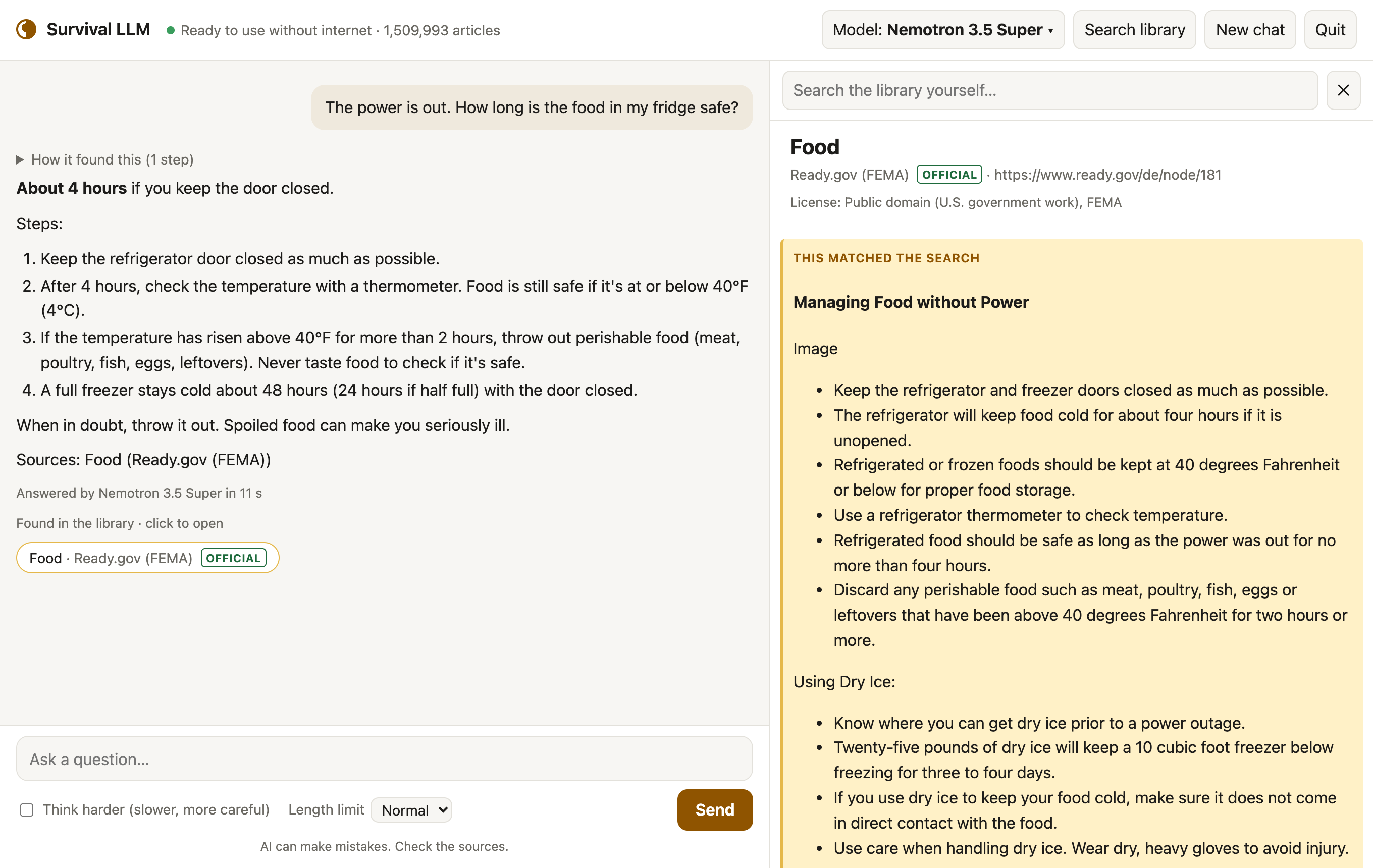
Survival LLM is a free AI assistant and emergency library that runs entirely on your own computer. Ask it how to keep food safe in a blackout, treat a burn, or purify water, and it answers from trusted sources and shows you exactly where each answer came from.
Free and open source. Set it up while you have internet; after that it needs none.
What it does
Works with no internet
The AI model and the library live on your computer. Nothing you ask leaves it.
Shows its sources
Every answer lists the articles it read. Click one to read it yourself, with the exact passage highlighted.
Made for emergencies
Medical references, FEMA and CDC guidance, survival manuals, how-to guides, repair guides and about 930,000 Wikipedia articles.
Pick your version
The app is the same everywhere. When it opens, it checks your computer's memory and downloads the AI model that fits. More memory means a smarter model.
| Your computer | AI model it uses | Our emergency test | Model download |
|---|---|---|---|
| Mac with 128 GB or more memory | NVIDIA Nemotron 3.5 Super | 21 of 22 right | 80 GB |
| Mac with 32–96 GB | Qwen3.8 27B | 21 of 22 right | 18 GB |
| Windows PC with 32 GB or more | NVIDIA Nemotron 3.5 Lightning | 19 of 22 right | 25 GB |
| Mac or PC with 16–31 GB | IBM Granite 4.2 8B | 14 of 22 right | 6 GB |
"Right" means it got the main point of official guidance right on 22 blackout and first-aid questions, graded blind, in our tests on an earlier build of the library (how we tested). Smaller models make more mistakes, so the app always shows the source to check.
Plus the library: a 9 GB download for everything (19 GB once installed), or 1.3 GB (3 GB installed) without Wikipedia and iFixit. Free disk space needed: the model's size plus 5 GB, plus about 27 GB while the full library installs (10 GB for the smaller one). Apple Silicon Macs (M1 or newer) with macOS 14 Sonoma or newer, and 64-bit Windows 10 or 11.
Set it up in three steps
Setup takes 20 minutes to about 2½ hours, depending on your computer and your internet speed. You only click for about 5 minutes; the rest is downloading.
- Download Survival LLM for Mac or Windows and unzip it. On Windows, right-click the zip and choose Extract All.
- Open it. On a Mac, double-click Survival LLM. On Windows, open the extracted folder and double-click Survival LLM.bat.
- Follow the setup. Pick a library and an AI model on one screen (the best model for your computer is already picked) and click Download. The app downloads the model, the library and, on Windows, the AI engine (it's built into the Mac app). If your internet drops or you quit, it picks up where it left off. Let it finish while you're online.
Mac: click Done, open System Settings > Privacy & Security, scroll down to "Survival LLM was blocked", click Open Anyway and confirm with your password. You only do this once.
Windows: click More info, then Run anyway.
What's in the library
Plain-text copies of openly licensed (some for non-commercial use only) and public-domain references, searchable in a fraction of a second:
- About 930,000 of Wikipedia's most-read articles
- WikiMed medical encyclopedia
- MedlinePlus (U.S. National Library of Medicine)
- UK Medicines A to Z (public sector information)
- WikEM emergency medicine
- Ready.gov (FEMA) emergency guides
- CDC travelers' health
- U.S. military medicine and survival manuals
- Risk references for estimating micromorts: life tables and U.S. death rates
- wikiHow how-to guides
- iFixit repair guides
- Appropedia (appropriate technology)
- Q&A on home repair, cooking, gardening, the outdoors and ham radio (Stack Exchange)
Each source keeps its own license, shown with every article; see the full list with licenses.
Good to know
It can be wrong
AI models make mistakes, the small ones more often. Every answer shows the articles it used, so you can check.
Private
No account, no tracking. Your questions never leave your computer, and once set up it works with the internet off.
Your own files
Add PDFs, Word documents, ebooks and notes, like your generator's manual or your family's emergency plan, and the AI searches them too. They stay on your computer.
Updates
Check for updates, at the bottom of the app, installs a new version in one click and keeps your models, library and files.
Battery
On a MacBook Pro we measured about 100 W while it answers, for 5 to 40 seconds per question: a full battery answers roughly 100 to 300. A small generator or power station runs it easily.
Update notes
Already have it? Click Check for updates at the bottom of the app.
0.4.1 October 29, 2026
- Windows: on a PC without Microsoft's free WebView2, which the app window needs, the app now installs it with Microsoft's own installer (a minute or so, the first time) instead of opening as a broken page. Thanks to Dueynkol for the report and the screenshot.
0.4.0 October 29, 2026
- Simpler first-time setup: one screen to pick the library and the AI model, with the best model for your computer already picked. While it downloads, you see the speed and the time left for each part. It keeps the computer awake, retries by itself when the internet drops, and picks up where it left off if you quit.
- Switch libraries: click the article count at the top (or Search library, then Switch or move the library) to change between Essentials and Everything. Your library keeps working while the other one downloads. Thanks to jubishop for the idea.
- Choose where things live: move the library to another folder or an external drive, and pick which folder Your files searches. New installs keep the library out of sight in the app's own folder; existing ones stay where they are. Thanks to Kronopath and remjax.
- A cleaner library: both libraries were rebuilt without about 2,700 repeated pages, so searches show more different articles. If you already have one, the app offers the new version (1.3 GB for Essentials, 8.7 GB for Everything), and yours keeps working until it's in. Thanks to ahalekelly.
- If a model download fails because an older Ollama app is running on your computer, the app now says so and what to do, and the message fits on screen. Thanks to zackbloom.
- Smaller fixes: a reply to "remember this" or "forget that" no longer gets a Sources line, a made-up article title next to a real collection's name is caught, and an answer that never finished no longer says "reasoning before it answered".
0.3.4 October 27, 2026
- Reasoning setting: next to Send, choose how much the AI may think before it answers: Off, 1,000, 4,000 or 16,000 tokens, or no limit. At the limit its thinking stops and it answers from what it has, so a model stuck reasoning in circles still answers. It replaces "Think harder".
- When the AI looked things up but never wrote an answer, it now gets the best articles it found and tries once more, instead of showing nothing. Thanks to betsyisaac for finding this.
- Ask it to look something up and it searches the library, even if it first answered from memory. Answers say whether they came from memory, from articles it read, or from search results it didn't open.
- A warning when Reasoning or Length limit is set to no limit.
0.3.3 October 27, 2026
- Mac: quitting with Cmd+Q now also stops the AI engine and frees the memory its model used. Before, it kept running in the background. Thanks to wigginthethird for the report and the fix.
- Library search no longer shows several copies of the same page, so the AI sees more different articles. Thanks to ahalekelly.
0.3.2 October 27, 2026
- The AI no longer saves your question as a memory note.
- Some answers no longer open with a made-up "Sources:" line that listed the AI's search commands instead of articles.
- Show reasoning reads more clearly: it says when you stopped it, the time shown is how long it thought, and long reasoning scrolls with the page.
- Windows: cleans up an empty folder that earlier updates could leave behind.
0.3.1 October 27, 2026
- Show reasoning: under each answer, open what the AI thought before it answered, with the searches and articles it read in between. It stays hidden until you click it. Most models reason first only when Think harder is ticked.
0.3.0 October 26, 2026
- Memory: tell it about yourself, like a family member's allergy or the generator you own, and it keeps a short note for later chats. See and edit every note under Memory, or turn its saving off.
- Downloads now work on computers whose network or antivirus uses its own certificates.